Heli DB-S1
512 MB memory
$3.5/ month
- Memory
- $3/mo
- 2 GB storage
- $0.5/mo
Managed PostgreSQL
Run PostgreSQL beside the services that use it. Create your database, connect privately, and manage data, extensions, and backups from the same project.
DATABASE_URLConnect without copying secrets
Add a private service reference and your application receives DATABASE_URL on deployment. Keep the password out of your repository; the reference resolves the database’s current credentials when you deploy again.
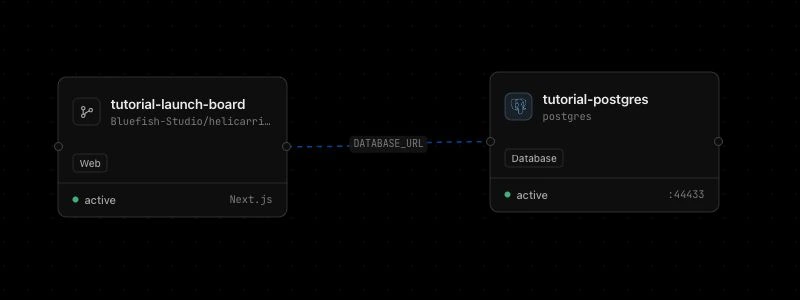
A real connection from our Next.js walkthrough. The disposable tutorial services were removed after testing.
Familiar tools, useful choices
The current catalog offers PostgreSQL 16, 15, and 14, with 16 selected by default. Choose a version compatible with your application and extensions.
Browse tables and run SQL from the database’s data tools. Keep connection settings, query results, and service metrics within reach.
Use supported extensions such as pgvector, PostGIS, and pg_trgm. Check the Extensions panel for what is available and installed in each database.
External access starts disabled. Use the private connection for Helicarrier services; review TLS and source IP controls when an outside tool needs access.
Ship the schema with the code
Set a release command on your application to run its migration before the new release starts. Then check a health endpoint that queries the database, and verify the actual records.
Keep schema changes compatible with the running application where possible. An application rollback does not roll back your database.
Follow the tested Next.js guide Practice Prisma failure and recovery Move PostgreSQL from RenderTHE VERIFIED EXAMPLE
Supply DATABASE_URL through a service reference.
Use npm run db:migrate as the release command.
Check readiness and the four sample records after a second deployment.
Choose your capacity
The totals below include each plan’s default storage. Choose 2–64 GB of provisioned storage as your data grows; backups are optional.
Standard USD rates. Confirm your account’s current rates in the dashboard.
512 MB memory
$3.5/ month
1 GB memory
$7/ month
2 GB memory
$14/ month
4 GB memory
$28/ month
Storage is $0.25/GB/month. Daily backups add 20% of the storage fee: $0.1/month for a 2 GB database. Monthly rates describe a full month of service, before any applicable fees or taxes. Your account’s current prices appear in the dashboard. How billing works
Recovery you can inspect
Daily backups are an optional add-on. Inspect completed backups and their timestamps before relying on a restore point, and test recovery with disposable data.
See the backup reference for retention and recovery limits.
Successful backups are retained across Latest, 7-day, 14-day, Monthly, Quarterly, 6-month, and Yearly horizons when an eligible backup exists.
This is at most seven successful restore points, not a separate daily copy for every day of a year. A new database will not have older restore points yet.
Restoring can replace data in the target database. Review the selected backup and stop conflicting writes before a planned restore.
Good questions
Yes. Use an internal service reference. External access is not needed for connections from your services on Helicarrier.
Yes. An outside client needs the database’s external connection and the appropriate access and TLS settings. See the connection guide before enabling it.
Do not assume they are. Review the optional add-on when choosing a plan, and check completed backup history on the database itself.
Customer MCP tools can inspect and operate resources within their granted permissions. Start with the correct project and environment, then give explicit instructions for changes. See the tested MCP workflow.
Keep building
Ready when you are
Bring your code. Give your next idea a home on Helicarrier Cloud.